BuzzerReady

The training tool that takes you from independent study to simulating the quizzing table.

BuzzerReady takes a quizzer from a printed verse list to being buzzer-ready — every verse, every key, every practice tool for the 2027 WPF season, in one app that runs on any phone, tablet, or laptop. Nothing to install.

New Bookmark the verses that keep slipping, and practice only those until they stick. See how

Study guides tell you what to learn. Practice nights show you whether you learned it. The distance between those two is where seasons are won, and it's the distance BuzzerReady was built to close: helping you learn the verses, and proving whether you can quote them, by allowing you to hear them, sing them, play them — and walk to the table already ready for the buzzer.
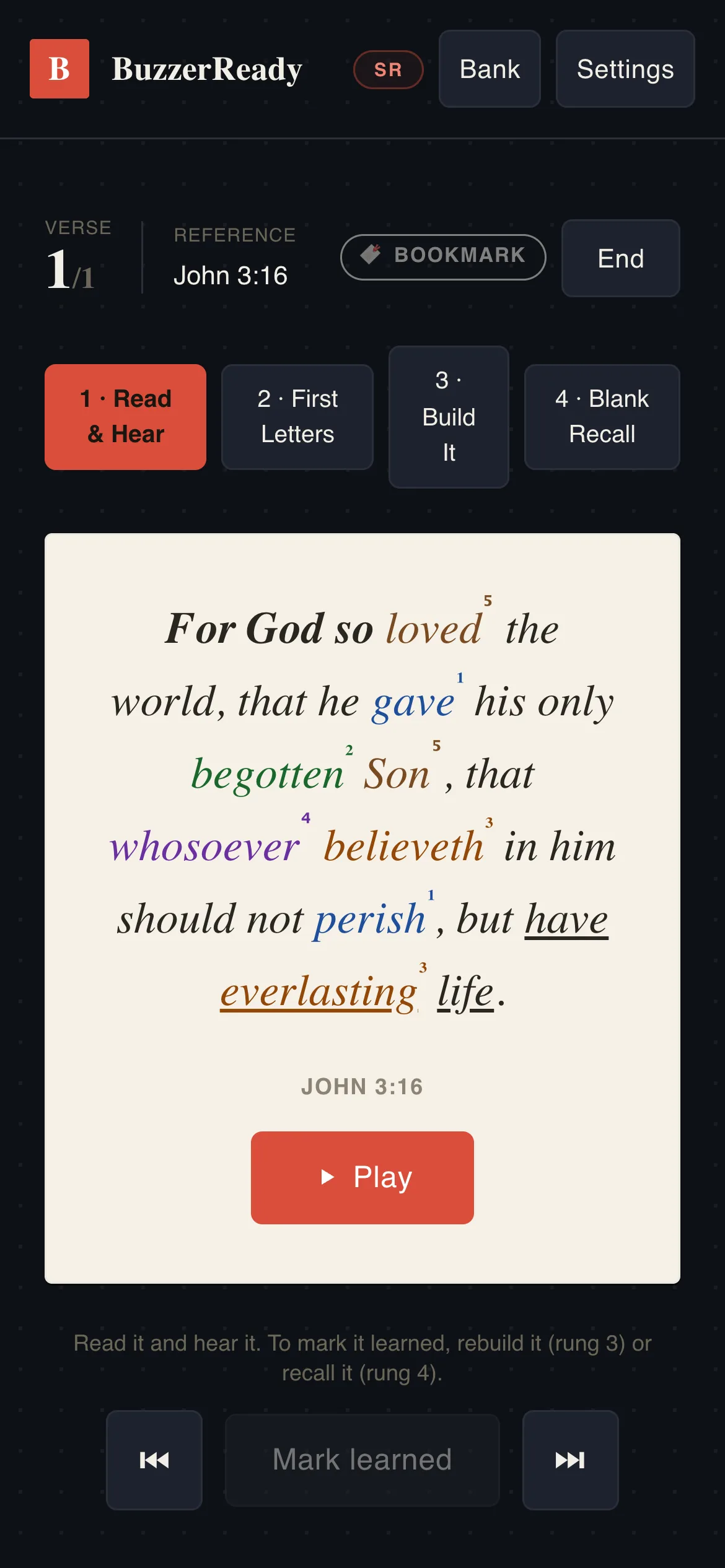
BuzzerReady's Learn screen on a phone. John 3:16 sits on a cream reading card with its key layer computed and marked: rare words colored by how many verses share them (1x through 5x), the verse's unique opening in bold, its ending underlined. Above the card, the four-rung ladder — Read & Hear, First Letters, Build It, Blank Recall — with 'Mark learned' still locked.

The Learn screen on John 3:16 — the computed key layer, and the four-rung ladder.

The Quiz, simulating the live environment

A voice reads the question. You buzz before it finishes.

That is the whole sport. A quizmaster reads a question aloud; the first quizzer who knows where it is going hits the buzzer and takes over — mid-sentence, mid-word, with the rest of the question still unsaid. Seasons are decided in that gap.

Every question is read aloud, and the words appear as they are spoken — not on a timer, but at the timestamp each word is actually said. Buzz and the voice stops, the screen stops on the same word, and the thirty-second clock starts. That is the room, on your phone.

Before each question, the quizmaster announces it the way a real quiz does – “Question number 5 is a two-part question worth 20 points.” In the quizzes and drills, when a question has more than one part, the app shows how many parts to give after you buzz in.

Short looping capture of a round in play on a phone. The scoreboard sits at the top — question 1 of 20, worth 10 points, you 10 and the practice opponent 10. A question from Psalm 27:5 is read aloud and its words appear as they are spoken; part-way through, a buzz stops the reading dead in the middle of a sentence, the answer clock starts at thirty seconds, and the screen reads "interruption — complete the question, then answer". The full question and the official answer follow, with the verse printed beneath it and its key words marked.

A real round: the question read aloud, a buzz cutting it mid-sentence, the answer clock, and the official answer.

New: My bookmarks

Practice only the verses you need.

Every quizzer has a few verses that keep slipping – the ones they stumble on in Quote, mix up with another verse, or miss in a quiz. Most practice time goes to verses that were never the problem.

So bookmark them. Tap the bookmark in Learn or Quote, or next to any verse in Search. Then open the Verse Range and turn on “My bookmarks.”

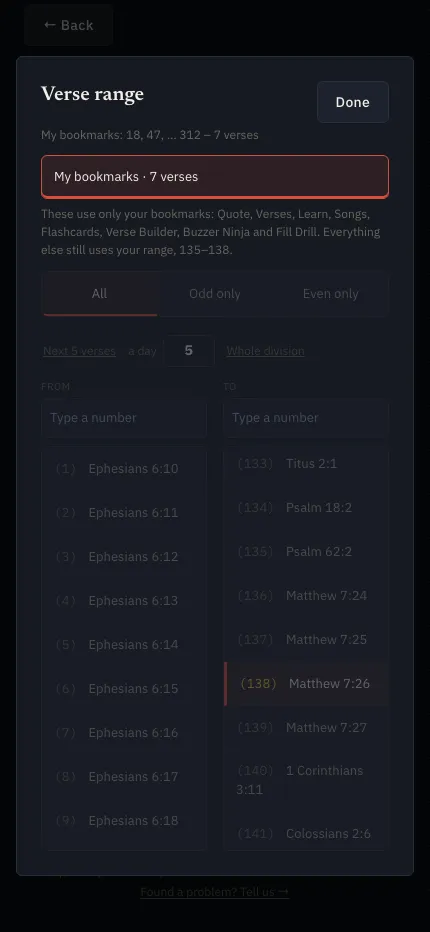
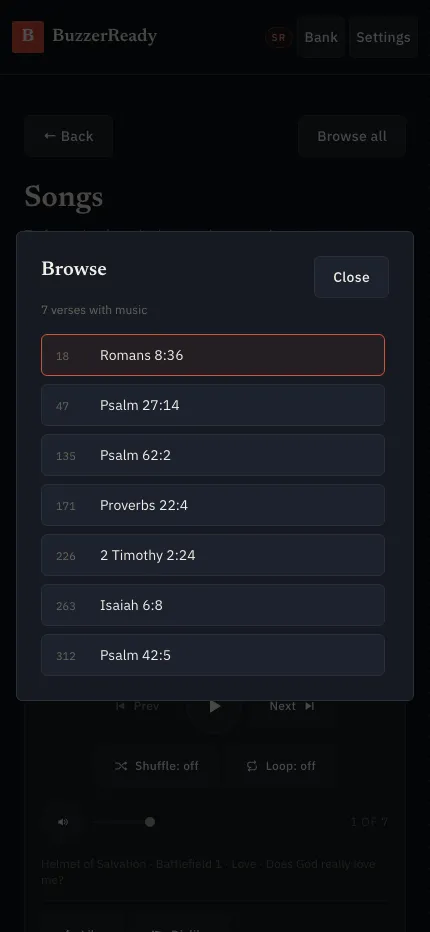
Now Quote, Verses, Learn, Songs, Flashcards, Verse Builder, Buzzer Ninja and Fill Drill use only those verses. Hear them read aloud, sing them, quote them, rebuild them word by word and play them – again and again, until they stick. When a verse is solid, take its bookmark off, and it drops out.

Your quizzes stay on your Verse Range, so you keep quizzing on everything you’re studying while you fix the weak spots. Each quizzer has their own bookmarks.

The Verse Range sheet on a phone with My bookmarks turned on: the summary reads My bookmarks: 18, 47, … 312 – 7 verses, and a line under the button lists the eight screens that use only the bookmarks while everything else keeps the range 135–138.
Songs on a phone with My bookmarks on: the Browse list shows only the seven bookmarked verses, each with its card number – Romans 8:36, Psalm 27:14, Psalm 62:2, Proverbs 22:4, 2 Timothy 2:24, Isaiah 6:8 and Psalm 42:5.

The Verse Range with “My bookmarks” on, and Songs playing only the seven bookmarked verses.

The study, computed

Every verse. Every key. Computed, and machine-verified word-for-word.

The 2027 season's study is 392 King James Version verses, and BuzzerReady carries all of them across the four sets of material — Cadet, Beginner, Junior, and Senior — machine-verified word-for-word. Then it goes where highlighters can't: the key layer. Unique beginnings, unique endings, and how many times each word appears in your material — 1x words through 5x words in the Senior material, with each younger division marked to its own narrower range — computed for every verse in every division. The markings that take a coach hours with a concordance are simply there, on every card, for every quizzer.

And when a family questions a question, every contest is checked against the King James Version and the WPF quizzing directors’ rulings before we answer.

The computed key-layer card for Matthew 7:25: 'And the rain descended, and the floods came, and the winds blew, and beat upon that house; and it fell not: for it was founded upon a rock.' Frequency words colored 1x–5x with superscript counts, the bold opening, and 'founded upon a rock' underlined as the verse's ending.
The computed key-layer card for Matthew 7:27 — identical to 7:25 for twenty-one words, then 'and it fell: and great was the fall of it.' The same coloring and markings, with the diverging ending underlined.
Close-up of the Matthew 7:25 card so the markings read clearly: 'rain' superscripted 4 in purple, 'descended' 2 in green, 'floods' 3 in sienna, 'founded' 1 in blue, and the underlined ending 'founded upon a rock.'

Matthew 7:25 beside 7:27 — the near-twin pair, word-for-word identical for 21 words. The computed markings show at a glance where the two verses part.

Listen

The whole study, read aloud — twice.

Every verse in the corpus is read aloud two ways: a natural reading for smooth, whole-verse listening, and a key-emphasized reading that leans on the key words so your ear learns what your highlighter displays. That's 1,038 audio files covering the entire study — machine-verified word-perfect against the text — ready for the drive to church, chores, and lights-out listening. Press play, close your eyes, and keep studying.

Psalm 139:14

Natural reading

Psalm 33:20

Natural reading

Romans 8:39

Key-emphasized reading (Senior rendering)

Matthew 7:25

Key-emphasized reading

The Listen player mid-verse on Psalm 139:14. The verse card carries the full key markings while the reading plays — pause button engaged, with Shuffle, Prev, Replay, Next, and Loop controls and Like/Dislike beneath.

The Listen player mid-verse — the marked card on screen while the reading plays.

The Songs player on John 3:16, playing at 0:03 of 2:21 — track 15 of 392. The header reads '392 of 392 of your verses have music so far.' The verse card is fully marked; filters for Section, Battlefield, Topic, Question, and Book sit above; Like/Dislike and 'Keep playing through the list' below.

The Songs player — the marked verse card on screen while its song plays.

Music

A song for every single verse — all 392 songs included.

Verses seem to stick when they're put to music. Every verse on the 2027 list has its own original scripture song — all 392 songs, included — in a wide range of styles, with a built-in player that filters by book or division, loops, shuffles, and auto-advances so practice can run in the car or at bedtime.

John 3:16

Scripture song

Lamentations 3:23

Scripture song

Romans 8:39

Scripture song

392 / 392 verses on the 2027 list have their own song — the whole study, sung.

Learn & Quote

A daily discipline, not a pile of flashcards.

Learn Mode walks each verse up a four-rung ladder — see it, work with it, then recall it with less and less help — and a verse can't be marked "learned" until the quizzer has actually recalled it from memory. No credit for scrolling past. Quote Mode then deals the prompt the way a quizmaster would, and the quizzer grades themselves — clean, stumbled, or missed — building an honest per-verse history. Spaced-repetition flashcards keep old verses from fading while new ones land. Together they turn "study your verses" from a chore into a structure a family can actually run: what's next, what needs work, and what's genuinely committed to memory.

Study by the numbers on your cards. Set a Verse Range – say cards 135–138 – and Learn, Quote, Verses, Songs, the quizzes and the games all stay inside it. Tap “Next 5 verses” when you’re ready to move ahead. Two quizzers splitting a set of verses? One picks “Odd only,” and the other picks “Even only.”

Learn's First Letters rung on Psalm 23:4: the verse reduced to 'Y, t I w t t v o t s o d…' with the instruction to recite from the first letters, tap a word to peek. The rung tabs show First Letters active, and 'Mark learned' is still locked — recall on rung 3 or 4 is what unlocks it.

The First Letters rung — "Mark learned" stays locked until the verse is actually recalled.

Quote Mode's marking view. Psalm 23:4 has just been revealed on its marked card, and beneath 'How did that go?' sit the three self-marks: Quoted clean, Stumbled, Missed — the honest per-verse history a quizmaster's prompt deserves.

Quote Mode's self-marking — clean, stumbled, or missed, building the per-verse history.

The arcade

Games — Training Designed As Play

Drills work better when it doesn't feel like work. BuzzerReady's games each sharpen a real quizzing skill: Verse Builder reassembles a verse word by word against your own best run; Buzzer Ninja, ClueDown, Fill Drill, Popcorn, RefSnap, and LinkUp each take a different angle on the same target — the keys, the references, and the exact wording, at speed. Scores and personal bests give quizzers something to beat that isn't each other. Every game below is live in the app today, and one of them is playable right here.

LinkUp in play: six references on the left — Lamentations 3:21, 1 Peter 5:7, Ephesians 5:16, James 1:3, 2 Corinthians 10:3, Ephesians 6:12 — matched to the openings they begin with ('For though…', 'Casting…', 'Redeeming…', 'Knowing…', 'For we wrestle…', 'This I…').
LinkUp
RefSnap in play: '"temperance" — this word is in one verse of study and no other,' over six candidate references waiting for the snap.
RefSnap
ClueDown in play: the clue is '"put" — in this verse and no other,' worth 100, with 'Take a clue · −20' on offer and the book grid ready for the first deduction.
ClueDown
Fill Drill in play on Ephesians 6:18: 'Praying always with all prayer and ____ in the Spirit…' with the word bank — watching, supplication, perseverance, thereunto, supplication — beneath, 5 blanks left.
Fill Drill
Popcorn in play: 'Tap every verse in The Belt of Truth — 7 of the 50 belong,' with reference cards (1 Corinthians 3:11, Proverbs 3:6, Ephesians 5:16) popping onto the field against the timer.
Popcorn
Verse Builder mid-game on Lamentations 3:22. The reference is the prompt; the verse is being rebuilt word by word from a bank of its own words — 8 of 16 placed ('It is of the LORD'S mercies that we…'), stumbles: 0.
Verse Builder — playable below

Try it — Verse Builder

Rebuild a verse from a bank of its own words, tapping them in order. Three sample verses from the 2027 study — right here, no account, nothing to install.

Play together

Buzzer Rooms are coming this season. And no chat, ever.

Practice is better with a table of people around it. Buzzer Rooms are coming this season. They aren’t in the app today, and they’ll land in every pass holder’s app the day they’re ready, at no new charge. One promise sits underneath them, written for parents: no chat, ever. Quizzers buzz, answer, and score. They cannot message each other – not in a room, not anywhere in BuzzerReady.

No chat, ever. Quizzers buzz, answer, and score. They cannot message each other — not in a room, not anywhere in BuzzerReady.

For coaches & church programs

Built for the coach who carries the program.

In most churches, quizzing runs on one coach with a roster, a van schedule, and no spare evenings. BuzzerReady's program layer is built for that coach: rosters with no per-name charge — every quizzer in your program on one roster; seats are what a Program pass buys; practice reporting that shows each quizzer’s quizzes, drills, Quick Draw and The Round, when their parent allows it; assignments, so the whole team works the same focus areas between meetings; and And a church or a coach can pay for another family’s season. And one invitation per family: the parent adds every quizzer from the same link, so your time goes to coaching, not to managing accounts.

The program layer

Rosters with no per-name charge

Every quizzer in your program on one roster. Seats are what a Program pass buys.

Practice reporting

Each quizzer’s quizzes, drills, Quick Draw and The Round – when their parent allows it.

Assignments

The whole team works the same focus areas between meetings.

Pay for another family’s season

A church or a coach can pay for a quizzer’s Season Pass.

One invitation per family

Send one invitation, and the parent adds every quizzer in the family to your team.

Coming this season

Your Season Pass grows all season. The price doesn't.

BuzzerReady isn't finished growing — that's the plan, not an apology. A Season Pass covers the whole season, and every tool we add during the season lands in every pass holder’s app at no new charge. Since August that has meant the full read-aloud quiz, Quick Draw and the buzzer games, the Verse Range by the numbers on your cards, odd or even verses, picking up where you left off – and now My bookmarks. Buzzer Rooms are coming this season. The page you're reading will grow with it. What we won't do is promise dates we'd have to hedge, or raise the price on people who purchased a Season Pass early.

Coming this season

Buzzer Rooms

They land in every pass holder’s app the day they’re ready.

In the app now

The full quiz experience

Read-aloud, word-synced questions — interruptible mid-word, at table pace.

In the app now

Buzzer games on real questions

Quick Draw and the buzzer games, built on the read-aloud questions — buzzer skills the way the competition demands them.

In the app now

My bookmarks

Practice only the verses that keep slipping, until they stick.

Pricing

One price function. No surprises.

BuzzerReady's pricing comes from a single price function — the same one that computes what the page shows you here and what checkout will actually charge. Work it out below: select your number of quizzers, and see the resulting price figure. No call-us tiers, no coupon games, no gotchas at checkout — and no price hikes mid-season on pass holders.

Prefer to see it all at once? The full price sheet sits right below the calculator — every plan at a glance. Nobody typed those numbers in: the sheet is rendered from the same price function that runs the calculator and the checkout, so the sheet, the calculator, and your charge can never disagree.

Two questions. The answer comes from the same price function that runs checkout.

1 · What are you buying?
2 · How many?

Sponsored season: A church, a coach, or a family friend can pay for one quizzer's season for another family.

Household season pass

One family's quizzers, one pass for the season.

1 quizzer$25.00
2 quizzers$40.00
3 quizzers$55.00
4 quizzers$70.00
5 quizzers$75.00
6 quizzers and beyond$75.00

Each quizzer takes a paid seat, up to a maximum of five in one household. Only after all five paid seats are filled will we add further seats free on request, answered within one business day.

Program season pass

A church or team program — one seat per quizzer, minimum 7.

First 7 seats (one flat rate)$120.00
Seats 8–21$15.00 / seat
Seats 22 and up$12.00 / seat
Programs of any sizeset up personally at the same per-seat scale — outreach@buzzerready.com

Each seat is charged at the rate of the band it falls in — the whole order is never re-priced at one rate.

Add-ons

Sold singly, alongside either pass.

Sponsored season$25.00 each
Coach seat$25.00 each

A church, a coach, or a family friend can pay for one quizzer's season for another family.

Every Season Pass covers the 2027 season and runs to July 31, 2027, whenever it's bought. Every purchase carries a 14-day refund window. Figures on this sheet are computed by the same price function that runs checkout.

Start your season

Choose your pass above and pay — you'll set up your account and add your quizzers right after checkout.

Choose your season pass

One Household pass covers every quizzer in your family. Each quizzer has their own practice record and bookmarks, and you switch between them on the same phone or tablet – the app asks “Who’s practicing?” when it opens.

The promise

Built for minors from day one: no ads, no tracking, no data ever sold.

Built for minors from day one: no ads, no tracking, no data ever sold. Accounts hold a quizzer's practice history, the account holder's acceptance records, and Season Pass status — nothing else — and young quizzers never need an email address. No chat, ever — children cannot message each other here. And a parent can see, export, or delete every piece of data we hold about their child — at any time, for any reason.

Everything this page and the app need — fonts, styles, all of it — is served by us, not by third-party origins. The details live in plain English in our Privacy Notice and Children's Privacy Notice; they're short on purpose, and they explain exactly how our systems function.

Questions

Frequently Asked Questions

Getting started

What is BuzzerReady?

BuzzerReady is a training app for Bible quizzing. It takes the full season material and turns it into everything your quizzer needs to learn it and drill it — the verses read aloud and set to music, thousands of read-aloud questions, timed quizzes and rounds with real rulebook scoring, flashcards, and games — all in one place, on any device.

Is BuzzerReady the official quizzing program?

BuzzerReady is an independent training tool built to match the 2027 WPF season material. It helps your quizzers prepare — it doesn't replace your league's official rulebook, materials, or events.

What material is inside?

The complete 2027 Armor of God corpus — all 392 verses in the King James Version, marked exactly like the printed study cards your quizzers already use — along with read-aloud questions across all four divisions: Cadet, Beginner, Junior, and Senior.

What translation does it use?

The King James Version (KJV) throughout, matching the season's material.

We haven't officially started our season yet — should we wait?

No need to wait — this is the ideal time. With Scripture scope you set how far your team has learned, and every quiz, drill, and round asks only what they already know. Start narrow, ease your quizzers in at kickoff, and widen the scope as the season goes.

Devices and access

Is BuzzerReady an app or a website?

It's a web app. There's nothing to download from an app store — it runs right in your browser. On a phone or tablet you can add it to your home screen and it opens full-screen, just like a regular app.

What devices does it work on?

Any phone, tablet, or laptop with a current web browser. Your quizzer can practice on whatever's handy and pick up where they left off on another device.

Do I need to install anything or keep it updated?

No. Because it runs in the browser, you always have the latest version — nothing to install, nothing to update.

What if our internet connection drops?

Once BuzzerReady has opened on your device, it keeps working. A note at the top says “We couldn’t reach BuzzerReady. Check your connection – your practice is still here.” When the connection comes back, the note goes away on its own, and practice done in the meantime is saved.

How do I reset or change my password?

Forgot it? On the sign-in screen, tap “Forgot your password?” and we’ll email you a link to set a new one. Signed in and want a new one? Go to Settings, then Account, then “Change password.”

How do I change my sign-in email?

Go to Settings, then Account, then “Change sign-in email.” We send a link to the new address, and the change happens when you open it. We also let the old address know. Only the account holder can change it.

Setting up your quizzer

Who sets up the account?

A parent or adult leader. BuzzerReady is set up and managed by an adult, with a consent step before anything begins — quizzers don't create their own accounts.

How do I add my quizzer?

Once your account is set up, you add each quizzer from there and choose their division.

Can I set up more than one quizzer?

Yes. A household can have several quizzers, and you add each one from your account. (See the plans for how family pricing works.) Each quizzer has their own practice record and bookmarks. With two or more quizzers, the app asks “Who’s practicing?” each time it opens, and you can switch any time by tapping the quizzer’s name at the top of the screen.

How does BuzzerReady handle my child's information?

Accounts are created and controlled by a parent or adult leader, with a consent step up front. You can review how we handle information in our Privacy Policy and Terms at buzzerready.com.

Plans and seats

How does pricing work?

You buy a season pass for each quizzer, and family pricing brings the cost down for additional quizzers in the same household. You can see the current plans at buzzerready.com.

Does my season pass renew automatically?

No. The 2027 season pass is a one-time purchase — there's no auto-renewal and no recurring charge. Your access runs through the end of the season, July 31, 2027.

Can I add seats later in the season?

Yes. You're not locked into a number when you buy — add seats any time from your account as more quizzers join. You only pay for the seats you use.

What if I have more than five quizzers in one household?

Each quizzer takes a seat, up to five paid seats in a single household. If you need more than five in the same household, we'll add the additional seats at no charge on request.

Can a coach or church set this up for a whole team?

Yes — that's what the Program pass is for. A program account gives you a coach's view of your team: manage your seats, invite families to link their quizzers, suggest what each quizzer should work on, and see how your team is practicing. A program runs one team per division, and each coach signs in with their own account and sees only the teams they are assigned to. A Coach seat gets a coach into the app to run practice; it keeps no practice record of its own. Pricing is per seat and gets better the more seats you buy — you'll find the Program pass in the plans at buzzerready.com. Each quizzer is added by their own parent or guardian from your invitation – one invitation covers the whole family. Step by step: Getting started for coaches and programs.

Using BuzzerReady

What is "The Round"?

The Round is the heart of quizzing practice. A question reads aloud with the words appearing on screen in time with the voice; your quizzer buzzes in, and the audio cuts off mid-word right where they buzzed — with real rulebook clocks and scoring. It's as close to the table as practice gets.

What is Scripture scope?

Scope lets you set how far your team has learned — say, through Battlefield 4 of the Helmet of Salvation — and every quiz, round, and drill then asks only what your quizzer can already answer. As they learn more, you widen the scope and the app grows with them.

Are the verses read aloud and set to music?

Yes — every verse is read aloud, and every verse is set to music, so your quizzer can learn by ear as well as by sight.

What else can my quizzer practice with?

Full quizzes, drills, buzz-timing games, flashcards, and Learn, Quote, and Listen modes — across all four divisions.

How do I use My bookmarks?

Bookmark any verse that gives your quizzer trouble – tap the bookmark in Learn, in Quote after the verse is shown, or next to a verse in Search. Then open the Verse Range on Quote, Learn, Verses or Songs and turn on “My bookmarks.” Quote, Verses, Learn, Songs, Flashcards, Verse Builder, Buzzer Ninja and Fill Drill then use only the bookmarked verses, and quizzes stay on your Verse Range. When a verse is solid, take its bookmark off. Turn “My bookmarks” off, and everything goes back to your range. Each quizzer has their own bookmarks.

Still need help?

Can't find your answer here? Email us at outreach@buzzerready.com and we'll help.

2026 archive — access by grant. The 2026 season is preserved as an archive and is no longer publicly browsable. Access is granted individually — if you have received a grant code, enter it here.